

Instagram remains one of the most widely used social platforms among adults aged 18-50. After Facebook and YouTube, it’s still the third-most-popular social app in the U.S., great for endless entertainment but not so great for your privacy or mental well-being. With every like, comment, and upload, Meta quietly builds a massive database of personal information to power its multibillion-dollar advertising machine.
So if you’re feeling overwhelmed by constant scrolling or concerned about how much data Instagram collects, you might be ready to step back or step away entirely. In this guide, you’ll learn:
- How to deactivate or permanently delete your Instagram account
- How to regain control of your online privacy
- How to remove your data from circulation on your own, or with a trusted data-removal service
How to Delete Your Instagram Account (Complete Guide)
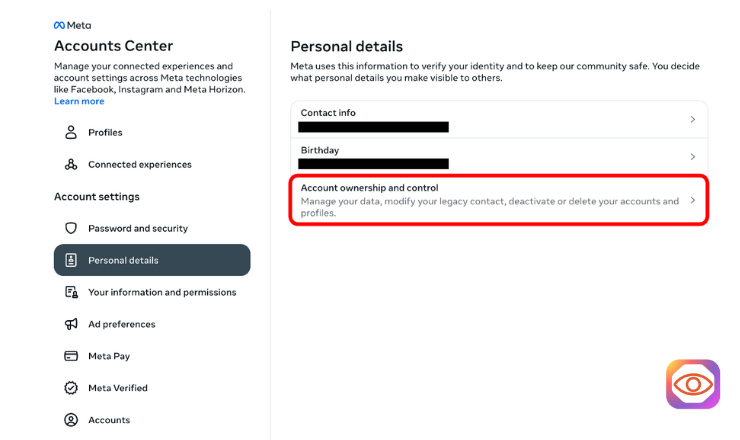
To permanently delete your Instagram account, you’ll need to access the “Account ownership and control” section inside the Accounts Center. Once you’re ready, the process takes only a few steps:
- Log in to Instagram.
- In the lower-left corner, click More > Settings.
- At the top, open the Accounts Center.
- Select Personal details, then Account ownership and control.
- Tap Deactivation or deletion, and choose the profile you want to delete.
- Select Delete account, click Continue, and follow the remaining prompts.
Download Your Instagram Data Before Deleting
Before you delete your account, you’ll likely want a copy of your photos, videos, and activity. Here’s how to download everything:
- Go back to the Accounts Center and choose Your information and permissions.
- Select Download your information, then click Download or transfer information.
- Choose all available information and select Download to device.
- Pick your preferred format (HTML or JSON) and media quality (low, medium, or high).
How to Deactivate Your Instagram Account (Step-by-Step)
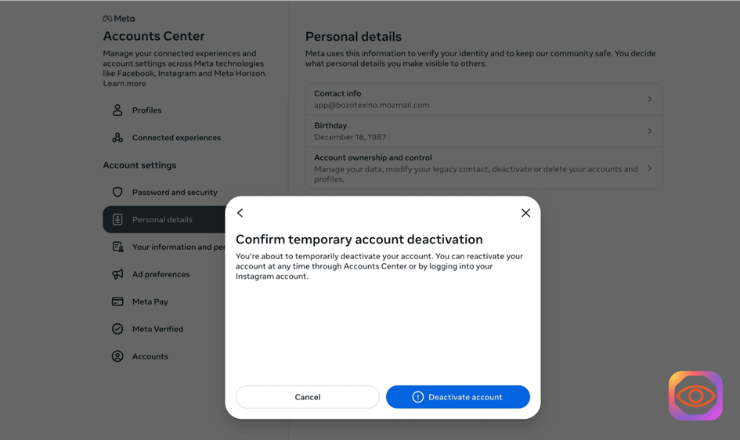
Deactivation is a temporary option that hides your profile for up to 30 days. No one can see your account during this time, not even you, but you can return whenever you want. Note that Instagram only allows one deactivation per week.
The process mirrors the deletion steps:
- Open the Accounts Center.
- Go to Personal details > Account ownership and control.
- Select Deactivation or deletion.
- Choose the profile to deactivate.
- Select Deactivate account, then hit Continue.
- If you usually log in through Facebook, Instagram will ask you to create a new password.
- Complete the on-screen steps and confirm deactivation.
Should You Delete Instagram or Deactivate It?
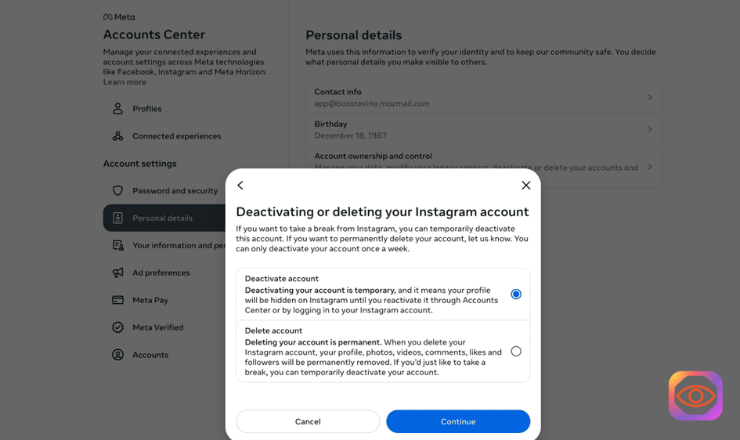
Completely deleting Instagram can feel like a big leap. Many people use it for news, connection, creativity, and archiving years of memories, so it’s understandable if you’re hesitant.
Here’s a quick way to decide:
Deactivate if…
- You’re doomscrolling and need a short break.
- You’re unsure whether you want to leave the platform permanently.
- You want to temporarily vanish from Instagram without losing anything.
Delete if…
- Instagram is affecting your mental health.
- You’re experiencing harassment or doxxing.
- You want out of the data-tracking ecosystem entirely.
- You’re ready to step away from the platform permanently.
What Happens When You Delete an Instagram Account?
Deleting your account is final, but not immediate.
- After requesting deletion, you get 30 days to change your mind.
- During those 30 days, no one can see your content.
- After the grace period, Instagram begins the complete removal process.
- It may take up to 90 days to fully clear your data from Meta’s servers.
Because of this, always download your data first.
Does Instagram Delete All Your Data Permanently?
When your account is deleted, your photos, videos, and posts are removed. Instagram then continues wiping the rest of your stored information over the next few months.
But here’s the catch: Instagram has already shared portions of your data with partners across the ad-tech ecosystem, including data brokers and marketers. That information doesn’t disappear when you delete your account.
Examples of data Instagram stores and may have shared include:
- Autofill and contact data
- Device details
- Personal info
- Search history
- Link and browsing activity
- Off-Instagram website visits
- Ad and business interactions
To remove that data from other companies, you’ll need a more comprehensive privacy strategy.
How to Protect Your Data While Still Using Instagram
If you’re not ready to delete your account, there are several steps you can take to reduce tracking and tighten your privacy:
1. Opt Out of Optional Cookies
Go to Accounts Center > Your information and permissions, then toggle off every optional cookie.
2. Make Your Profile Private
You can:
- Require new followers to request access
- Block unwanted users
- Limit who can view your posts
- Hide your profile info even from existing followers
3. Shorten Auto-Clear Search History
Instagram defaults to clearing your searches every 30 days. Change it to 3 days for better privacy.
4. Review Ad Preferences
Instagram offers a paid ad-free version or an ad-supported free version. Until you choose, Instagram cannot show you ads, so don’t pick an option.
5. Use a VPN
A VPN hides your IP address, making it harder for Instagram and advertisers to track your activity across the web.
6. Consider ID Theft Protection
If your personal information falls into the wrong hands, identity-theft monitoring services can alert you quickly and minimize damage.
Delete Your Instagram Data (and More) With a Data-Removal Service
Even if you delete Instagram, your data might still be stored by dozens — or hundreds — of companies. Data-removal services automate the process of finding and requesting removal from these databases. They:
- Locate all public data linked to you
- Send removal requests automatically
- Continue monitoring and resubmitting requests as needed
Popular options include:
- Incogni: Fast, affordable, and highly automated
- DeleteMe: Human experts manually process removal
- Kanary: Premium features with excellent user experience
Final Thoughts on Deleting Your Instagram Account
The modern internet wasn’t built for your privacy; it was built to extract data. If Instagram is draining your mental energy or exposing more of your life than you’re comfortable with, deleting your account might be the right move.
But before you commit:
Try a 30-day deactivation trial.
Remember that deletion doesn’t guarantee full privacy. You may still want tools like a VPN or ID-theft monitoring (Norton LifeLock and Aura are strong all-in-one options).
For long-term data protection, a data-removal service can help wipe your information from data brokers and advertising databases.
See Also:
How Instagram Story View Order Works
To View Instagram Stories Anonymously, Click Here